


Download 3D GameStudio – Game Development Powerhouse, Free, Secure, Windows & macOS
Why 3D GameStudio Stands Out in the Game‑Development Landscape
3D GameStudio is an exceptional development suite that lets creators build games in both two‑dimensional and three‑dimensional space without compromising on visual fidelity or performance. At its heart lies the A6 graphics engine, a next‑generation rendering core that delivers real‑time lighting, static and dynamic shadows, and a flexible material system. Whether you’re designing a sprawling open‑world adventure, a tight indoor puzzle, or a classic side‑scrolling platformer, the engine adapts to the needs of the project.
The software isn’t limited to graphics; it bundles a robust physics engine, a particle and effects system, a dedicated 2D engine, a full‑featured sound engine, and network capabilities for multiplayer experiences. This all‑in‑one approach means developers spend less time hunting for third‑party plug‑ins and more time focusing on gameplay. Beginners benefit from a visual scripting environment that requires no prior coding knowledge, while seasoned programmers can dive into C‑Script—a streamlined, C‑like language that unlocks the deepest layers of the engine.
In short, 3D GameStudio delivers a secure, free‑to‑try environment that scales from hobbyist prototypes to commercial‑grade releases.
Core Features and Integrated Tools that Power Your Game
- A6 Graphics Engine: Real‑time global illumination, dynamic shadows, and shader‑based materials that run smoothly on Windows and macOS.
- Dual 2D/3D Workflow: Seamlessly switch between 2D sprite‑based design and full 3D modeling without leaving the editor.
- Particle & Effect System: Create fire, smoke, water, and magic effects using a node‑based particle editor.
- Physics & Collision Engine: Rigid‑body dynamics, soft‑body simulation, and custom collision meshes for realistic interactions.
- Sound Engine: Integrated audio mixer, 3D positional sound, and support for popular formats like OGG and WAV.
- Network & Multiplayer Framework: Built‑in client‑server architecture, lag compensation, and easy matchmaking tools.
- C‑Script Programming: A simplified C‑style scripting language that gives developers full control over game logic, AI, and custom shaders.
- Asset Pipeline: Direct import of FBX, OBJ, PNG, and other common formats, plus automatic LOD generation.
- Cross‑Platform Export: One‑click publishing to Windows, macOS, Android, iOS, and HTML5.
- Extensive Documentation & Community: Comprehensive manuals, video tutorials, and an active forum for troubleshooting and sharing assets.
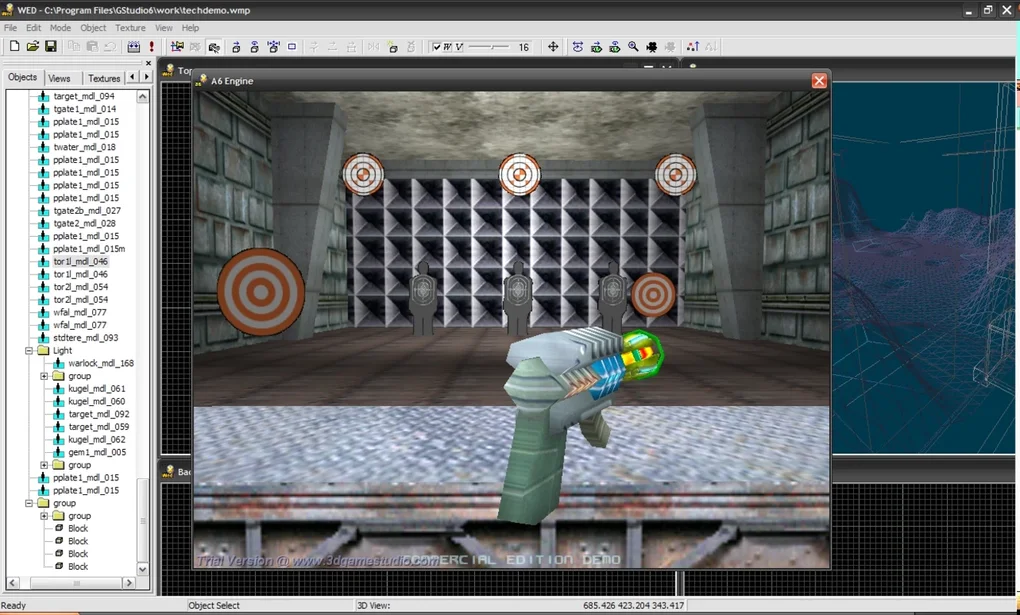
Beyond the headline features, 3D GameStudio offers a suite of productivity tools such as a timeline editor for cut‑scenes, a visual state machine for AI behavior, and a built‑in level editor that supports terrain sculpting and foliage placement. The integration of these tools means you rarely need external software, keeping your project files organized and your workflow efficient. For studios that prioritize rapid iteration, the real‑time preview window updates instantly as you tweak lighting or physics parameters, allowing you to see the impact of changes without a full rebuild. This level of responsiveness is a major time‑saver, especially when fine‑tuning gameplay balance or visual polish. Overall, the feature set is designed to be both deep for professionals and approachable for newcomers, striking a rare balance in the crowded game‑development market.
Step‑by‑Step Installation and System Compatibility
Downloading and Installing 3D GameStudio
Getting started with 3D GameStudio is straightforward. Visit the official website, click the “Download Free Trial” button, and choose the installer that matches your operating system. The installer is a signed executable (Windows) or a DMG package (macOS), ensuring a secure installation free from malware. After launching the installer, follow the on‑screen prompts: accept the license agreement, select an installation directory (the default location works for most users), and let the wizard copy files and register necessary system libraries. Once installation finishes, a shortcut appears on your desktop, and you can launch the application directly or via the Start menu on Windows, or the Applications folder on macOS.
System Requirements and Supported Platforms
Windows: Windows 10 (64‑bit) or later, with a minimum of 8 GB RAM, a DirectX 12‑compatible GPU (NVIDIA GTX 1060 or AMD Radeon RX 580 recommended), and at least 5 GB of free disk space. macOS: macOS 11 (Big Sur) or later, 8 GB RAM, a Metal‑compatible GPU, and 5 GB free storage. The engine also supports exporting to Android (4.4+), iOS (12+), and HTML5, though those targets require the respective SDKs to be installed separately. For optimal performance, a solid‑state drive (SSD) is recommended, especially when working with large texture atlases and complex level geometry.
First‑Run Configuration
Upon launching 3D GameStudio for the first time, you’ll be greeted by a configuration wizard that helps you set up the rendering pipeline, choose between OpenGL (macOS) or DirectX 12 (Windows), and define default project folders. The wizard also checks for available GPU drivers and prompts you to update if needed, ensuring you can leverage the latest shader features. After completing the wizard, the main interface loads, presenting a modular workspace with panels for the Scene Graph, Asset Browser, Property Inspector, and a real‑time Preview Window. You can customize the layout by dragging panels, saving workspace presets for future projects.
Troubleshooting Common Installation Issues
If the installer fails to run, verify that your system meets the minimum requirements and that you have administrative privileges. On Windows, disable any third‑party antivirus temporarily, as some security suites mistakenly flag the signed installer as suspicious. On macOS, you may need to allow apps from “identified developers” in System Preferences → Security & Privacy. In case of missing DLL or framework errors, reinstall the Visual C++ Redistributable (Windows) or the latest Xcode command‑line tools (macOS). The official support forum provides a comprehensive troubleshooting guide, and the community often shares step‑by‑step fixes for edge‑case issues.
Pros, Cons, and Frequently Asked Questions
Pros
- All‑in‑one suite eliminates the need for multiple third‑party tools.
- Powerful A6 engine delivers high‑quality graphics on modest hardware.
- Dual 2D/3D workflow caters to a wide variety of game genres.
- Free trial and affordable licensing make it accessible to indie developers.
- Extensive documentation and active community reduce the learning curve.
- Cross‑platform export streamlines publishing to Windows, macOS, mobile, and web.
Cons
- Advanced C‑Script features may require a steep learning curve for non‑programmers.
- Performance tuning for very large open worlds can be more complex than in specialized engines.
- Limited built‑in marketplace for asset sharing compared to some competitors.
- Mac support, while solid, lags behind Windows in terms of cutting‑edge graphics API updates.
Frequently Asked Questions
Is 3D GameStudio free to use for commercial projects?
3D GameStudio offers a free trial with full feature access for a limited time. For commercial releases, you need to purchase a license, which starts at $199 per seat. The license includes lifetime updates and royalty‑free distribution.
Can I develop mobile games with 3D GameStudio?
Yes. The engine supports exporting to Android and iOS. You’ll need the Android SDK and Xcode installed, but the export process is handled directly from the editor with a single click.
Do I need to know C‑Script to create a basic game?
No. The visual scripting system lets you assemble gameplay logic using drag‑and‑drop nodes. C‑Script becomes useful when you want custom AI, complex UI, or performance‑critical code.
What rendering APIs does 3D GameStudio use?
On Windows the engine uses DirectX 12; on macOS it relies on Metal. Both APIs provide modern shader capabilities and support high‑dynamic‑range (HDR) rendering.
Is there a built‑in asset store?
While there isn’t a dedicated marketplace inside the editor, the official website hosts a collection of free and paid asset packs, and the community forum frequently shares user‑generated content.
3D GameStudio offers a rare blend of power and accessibility. The integrated engine suite cuts down on external dependencies, and the A6 graphics core delivers impressive visuals even on mid‑range hardware. While the learning curve for C‑Script can be a hurdle for absolute beginners, the visual scripting alternative makes it possible to prototype quickly. Overall, it’s a solid choice for indie teams aiming to launch cross‑platform titles without a massive budget.
Final Verdict and How to Get Started
3D GameStudio positions itself as a comprehensive game‑development powerhouse that doesn’t force you to juggle multiple programs. Its A6 engine, coupled with a full suite of tools—from physics to networking—means you can take a concept from sketch to finished product entirely within one environment. The platform shines for developers who value cross‑platform flexibility and a balance between visual editing and code‑level control. While there are a few drawbacks, such as a modest learning curve for advanced scripting and slightly slower macOS updates, the overall value proposition is compelling, especially at its price point. If you’re ready to craft immersive 2D or 3D experiences, download 3D GameStudio today, follow the simple installation steps, and start building the next hit indie game or commercial title.
Take advantage of the free trial, explore the extensive tutorials, and join the active community to accelerate your learning. With regular updates, a solid support system, and an engine that scales from hobby projects to commercial releases, 3D GameStudio is a smart investment for any aspiring or seasoned game developer.







